
How I Protected 200+ Browser Tools Without Hiding Code (Domain Locks, Minification, and Edge Checks)
You can't hide client-side code, but you can make copying it slow, annoying, and useless. Here's the three-layer protection system I use for 200+ tools.

Key Highlights: A domain lock redirects copied pages back to your site. Minification makes code harder to read and modify quickly. Edge checks block scraper tools, hotlinking, and request floods before files load. This setup doesn't hide your code (you can't), but it makes copying slow, frustrating, and pointless for most attackers.
If your tool runs in the browser, your code ships to every visitor. You cannot hide it. The browser has to download it to run it. What you can do is make copying it slow, annoying, and useless on any other domain.
I built this exact setup for VisionVix World, where I ship 3D simulators and browser tools as static HTML pages. These are heavy JavaScript applications. Everything runs client-side. The source code has to reach the browser.
So instead of trying to hide what cannot be hidden, I built a simple three-layer protection system: a domain lock, minification, and edge checks. Each layer is cheap to run. Each one costs the copier time.
This article walks through the system I use: what each part does, what it cannot do, and how I set it up. I built this, so I am writing from the builder's side. That also means I will tell you plainly what this setup will not stop.
Why browser code cannot be hidden
JavaScript running in a browser cannot be completely hidden because the browser must download and execute it. Any minification or obfuscation can eventually be reversed using DevTools and debugging tools.
The goal is not to make code impossible to copy, but to make copying difficult and time-consuming. This discourages casual scrapers who want to quickly download, modify, and rehost a website.
It won't stop a determined developer from reverse-engineering the code, but it makes casual copying much harder.
The three protection layers
The setup has three parts. Keep your readable source private. Ship only a minified, locked version. Add checks at the edge to refuse bulk scrapers and hotlinkers.
Layer one is source control. I keep all simulators in a private folder called sim-src. This folder contains my readable source code, with comments and clear variable names. I never deploy this folder. It never touches the internet. The only place I edit code is here.
Layer two is the build process. A build script copies everything from sim-src into the public folder that gets deployed. During the copy, it minifies every script, strips comments from HTML and CSS, and injects a domain lock script into every page. The version that reaches the internet is always the processed one.
Layer three is edge checks. On Vercel, I run a middleware file before every request. It allows search engines and AI bots through. It refuses known scraper user agents. It blocks hotlinking of heavy files like textures and 3D models. It rate-limits per IP to slow down anyone asking for too much too fast.
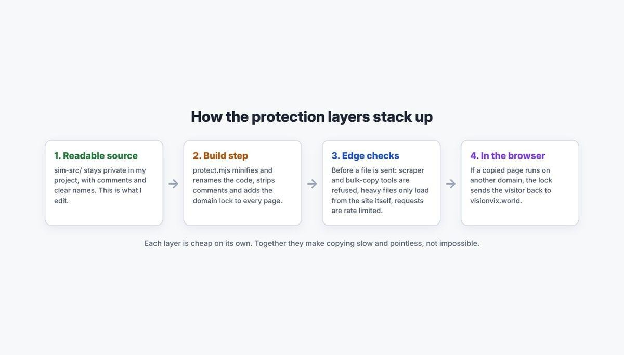
Each layer is a speed bump. None of them is a wall. But together, they remove the easy path.
What a domain lock does
A domain lock is a small script at the very top of each page. It checks the hostname where the page is running. If the hostname matches your allowed domains, it does nothing. If someone saves the page and hosts it on their own site, the script immediately redirects the visitor back to your real site.
A domain lock makes copied pages useless on other websites by redirecting visitors back to the original site.
The script runs before anything else loads. That means even if someone copies your entire page, sets up hosting, and sends traffic to it, the visitor lands on your site instead of theirs. The copied page becomes a redirect. It is useless.
Here is the concept, simplified:
javascript
(function () {
var host = location.hostname;
var allowed = /^(www\.)?example\.com$/;
if (allowed.test(host) || host === 'localhost') return;
location.replace('https://example.com' + location.pathname);
})();
Three details matter.
- First, allow localhost so you can test the built version on your own machine.
- Second, allow your preview domains. If you deploy on Vercel, every pull request gets a preview URL. If you do not allow those, every preview bounces back to production.
- Third, use location. Replace instead of location.href. Replace removes the copied page from the browser's back history, so the visitor cannot click back and get stuck in a redirect loop.
The domain lock does not stop someone from reading your code. It does not stop someone from removing the script. It stops a saved copy from working on another domain without additional effort. And most copiers do not put in additional effort.
What minification does, and what it cannot do
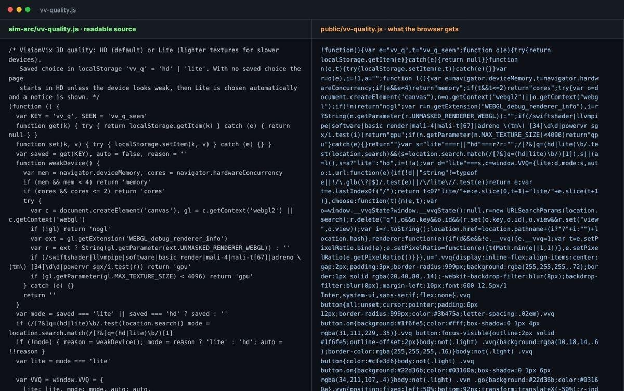
Minification removes comments, whitespace, and renames variables to shorter names, making code harder to read while keeping it functional.
I use Terser to minify my JavaScript files, with three main rules:
- Keep top-level names: Prevents breaking HTML onclick functions.
- Skip libraries: Avoids reprocessing vendor files like three.js.
- Never fail the build: If minification fails, the original file is kept.
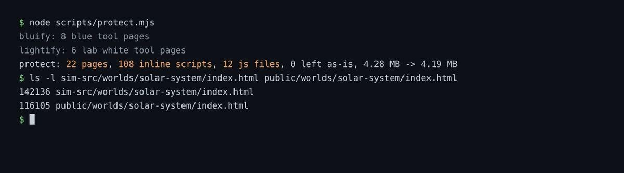
On visionvix.world, the total size dropped from 4.28 MB to 4.19 MB, while the Solar System page went from 142 KB to 116 KB.
Minification is not foolproof protection. Anyone determined can format and reverse-engineer the code, but it takes extra time and effort, making casual copying harder.
Step-by-step: how I set this up
This is the exact process I use on visionvix.world. I am writing this from the builder's chair, so I will include the mistakes I made the first time.
1. Keep two folders: readable source and build output
All simulators live in a private folder, sim-src, with comments and clear names. That is the only place I edit. A build script copies everything into the public folder that gets deployed. The readable source never leaves my project.
The first time I did this, I tried to minify in place. That was a mistake. I lost my readable version and had to restore it from git. Now the source and the build output are separate folders. The build script never touches the source.
2. Minify every script, but leave libraries alone
The build runs every inline script and every local JavaScript file through Terser. I skip files in vendor, lib, and node_modules. I keep top-level renaming off. If a script fails to minify, the build logs it and keeps the original.
I also strip HTML and CSS comments during this step. Comments often say more about how a tool works than the code does. Sentences like "this is a hack to fix Safari" or "TODO: replace this with a proper solution" are free intelligence for anyone reading the page source.
3. Add the domain lock to every page
The build injects a domain lock script as the very first thing inside the <head> of every page. It runs before anything else. The script checks the hostname and redirects if it does not match.
I allow localhost for local testing. I allow *.vercel.app for preview deployments. I use location.replace to avoid back-button loops.
The first version of this script was too strict. I did not allow preview domains, so every Vercel preview bounced to production. That made pull request reviews impossible. Now the allowed pattern includes both production and preview hostnames.
4. Check the result, every build
The build script prints what it did. I can see how many files were minified, how many were skipped, and the size change. Here is the real output from the current build:
- Total files processed: 23
- Minified scripts: 18
- Skipped (libraries): 5
- Size before: 4.28 MB
- Size after: 4.19 MB
If something was skipped unexpectedly, I see it right away. If the size goes up instead of down, something broke.
5. Add checks at the edge
I added a middleware.js file in the Next.js project root. It runs before every request. The logic is simple. Check the user agent. If it is a known bot, allow it. If it is a known scraper, refuse it. If the request is for a heavy file and the referer is not my domain, refuse it. If the IP has made too many requests in the last minute, slow it down.
The middleware runs on Vercel's edge network, so it is fast and does not add latency to real visitors.
What this setup does not stop
None of these layers is unbreakable. I want to be honest about that.
A patient developer will reverse the minification. Debuggers exist. Code formatters exist. Someone who wants to study my code badly enough will succeed. I am fine with that. I learn from other people's code too. The goal is not to stop learning. The goal is to stop lazy copying.
Someone can find and delete the domain lock. It is right there in the source. If someone knows to look for it, they can remove it. But most people scraping a tool do not read the code line by line. They save the page and rehost it. The domain lock stops that.
A real browser bypasses edge checks. If someone opens the page in Chrome and manually saves each file, the edge checks do nothing. The middleware cannot tell the difference between a real visitor and a person saving files. That is fine. Manual copying is slow. Slow is the goal.
Someone can scrape the page by running JavaScript. A headless browser like Puppeteer can load the page, execute the domain lock, and still capture the DOM. If someone goes that far, they are doing actual work. I respect that more than I respect right-click-save-as.
Most people who copy tools want quick wins, and this multi-layered approach specifically removes easy copying.
The point is that each layer is cheap for me and costs the copier time. I spend a few hours setting this up once. They spend hours every time they want to copy a new page. The economics favor the builder.
Why this approach instead of heavy obfuscation
I tried heavy obfuscation once. I ran the code through a tool that turned it into an unreadable mess of encoded strings and control flow flattening. The page got bigger. The page got slower. And the obfuscation was still reversible with the right tool.
Heavy obfuscation makes pages bigger and slower while still being reversible. Minification plus a domain lock is a better trade-off. The page stays fast. The code is hard to read but not impossible. And the domain lock makes a copy useless without extra effort.
For a deeper look at how I think about dev tooling and build steps, I covered my entire dev setup migration process in an earlier post. The philosophy is the same: automate the repetitive parts, keep the source clean, ship the protected version.
I also document most of my build process and tool development on my YouTube channel, where I walk through real projects, mistakes, and fixes.
What should stay on the server?
The best way to protect sensitive code is to keep it on the server instead of the browser. API keys, secret logic, and paid features should never be exposed in front-end code.
Payment and access checks should happen on the server. The browser sends a request, and the server verifies permission before responding.
Hiding unlock codes in obfuscated JavaScript does not work because users can inspect and bypass the checks.
If a feature is valuable, protect it with server-side validation, not JavaScript obfuscation.
The real goal: make copying pointless
The goal of this setup is not to make copying impossible. The goal is to make copying slow and annoying enough that most people give up. It is a speed bump, not a vault.
I built this because I ship a lot of tools. Some of them take weeks to build. I do not want someone to right-click, save, and rehost them in ten minutes. I want them to have to work for it. And if they work for it, they might as well build their own version.
If you are building browser tools, you face the same constraint I do. Your code has to ship to the visitor. You cannot hide it. But you can make copying it slow. Keep your source private. Ship a minified build. Add a domain lock. Add edge checks. Each layer is cheap. Each one costs the copier time. And time is what you are protecting.
About the author
- Solo founder shipping AI tools at visionvix.com. I write about deterministic agent patterns, Next.js deployment, and how to ship 200 products in 4 months without burning out.
Comments
Join the discussionNo comments yet. Be the first to comment.